HTML Introduction
- HTML stands for Hyper Text Markup Language
- A markup language is a set of markup tags
- HTML documents are described by HTML tags
- Each HTML tag describes different document content
HTML Example
A small HTML document:
<!DOCTYPEhtml><html><head><title>
Page Title
</title></head><body><h1>
This is a Heading
</h1><p>
This is a paragraph.
</p></body></html>Try yourself >>
Example Explained
- The DOCTYPE declaration defines the document type to be HTML
-
The text between
<html>and<html>describes an HTML document -
The text between
<head>and<head>provides information about the document -
The text between
<title>and<title>provides a title for the document -
The text between
<body>and<body>describes the visible page content -
The text between
<h1>and<h1>describes a heading -
The text between
<p>and<p>describes a paragraph.

Using this description, a web browser can display a document with a heading and a paragraph.
HTML Tags
HTML tags are keywords (tag names) surrounded by angle brackets:
< tagname > content < / tagname >-
HTML tags normally come in pairs
<p>and<p> - A markup language is a set of markup tags
- HTML documents are described by HTML tags
- Each HTML tag describes different document content
The start tag is often called the opening tag. The end tag is often called the closing tag.
Web Browsers
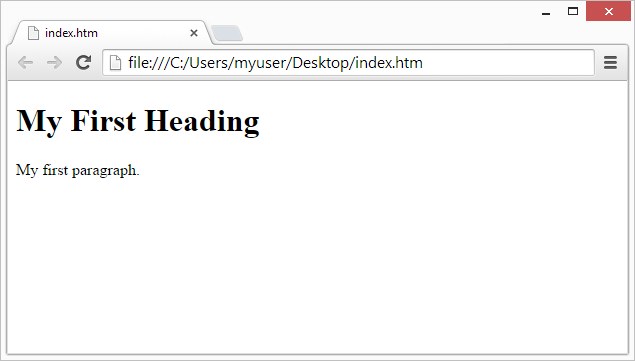
The purpose of a web browser (Chrome, IE, Firefox, Safari) is to read HTML documents and display them.
The browser does not display the HTML tags, but uses them to determine how to display the document:
HTML Page Structure
Below is a visualization of an HTML page structure:
Only the </body> area (the white area) is displayed by the browser.
The </!DOCTYPE> Declaration
The </!DOCTYPE>declaration helps the browser to display a web page correctly.
There are different document types on the web.
To display a document correctly, the browser must know both type and version.
The doctype declaration is not case sensitive. All cases are acceptable:
</!DOCTYPE html>
</!DOCTYPE HTML>
</!doctype html>
</!Doctype Html>
Common Declarations
HTML5
HTML 4.01
</!DOCTYPE HTML PUBLIC "-//W3C//DTD HTML 4.01 Transitional//EN" "http://www.w3.org/TR/html4/loose.dtd">
XHTML 1.0
</!DOCTYPE html PUBLIC "-//W3C//DTD XHTML 1.0 Transitional//EN" "http://www.w3.org/TR/xhtml1/DTD/xhtml1-transitional.dtd">
All tutorials and examples at Main Coding use HTML5.
Main Coding Home Next Chapter